


New article
Recently updated
PolicyConnect Release June 2025

Pages in this Section
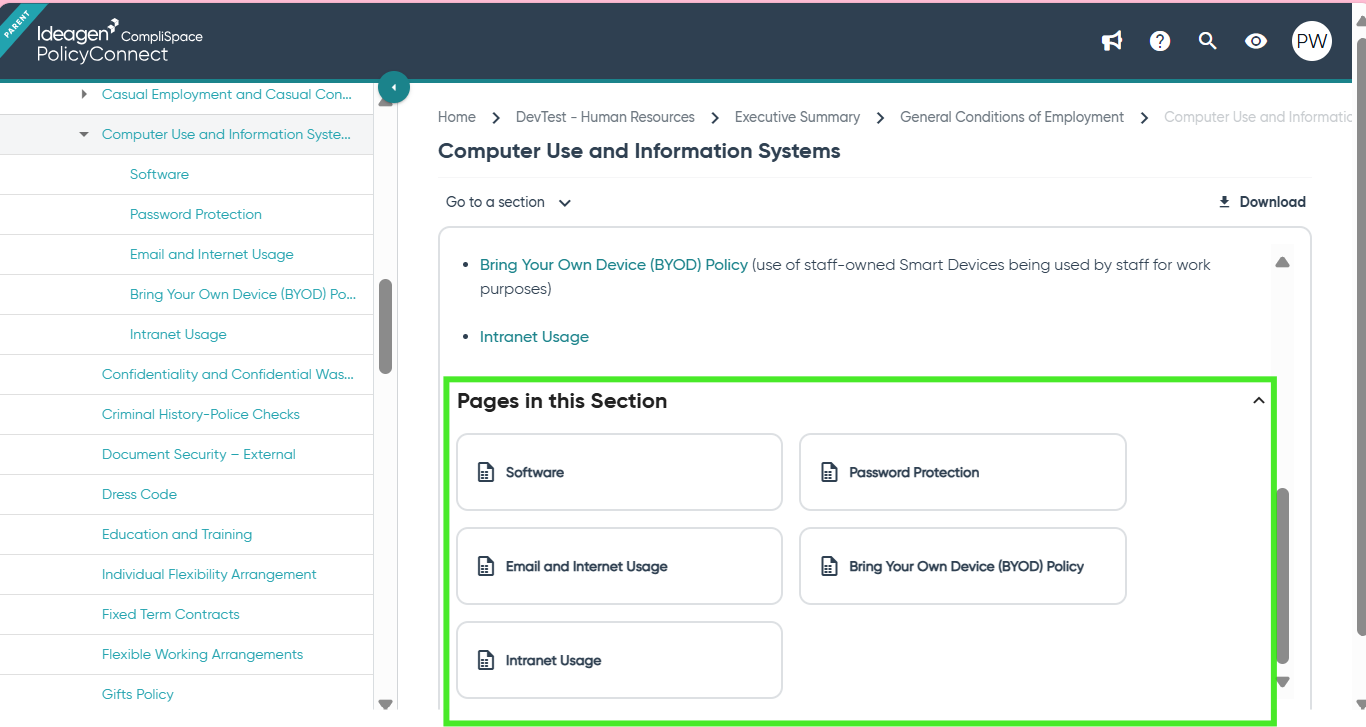
Introducing "Pages in this Section"
We have introduced a new “Pages in this Section” feature in PolicyConnect. This enhancement will make it easier for users to navigate and find relevant child pages within your policy content.
What to Expect
- Temporary Duplication of Links: For Ideagen Policy Logic-provided content, you may notice that both the existing landing page links and the tiles in the new "Pages in this Section" area, display links to the same child pages. This is expected during the transition period.
- Content Team Updates: Over time, the Ideagen Policy Logic content team will remove the old landing page links from our content. Once this is complete, the "Pages in this Section" area will automatically display the correct links for you, with no manual updates required.
- Improved Handling of Deadlinks: Previously, if you switched off a Ideagen Policy Logic page and replaced it with your own UGC (user-generated content), this could result in deadlinks. You would then need to consult the contextualisation guide, activate the landing page variable, and manually update your table of contents. With this release, these issues will be resolved automatically by the system, reducing the need for manual intervention.
- Benefits for Your Own UGC Pages: If you have created your own UGC pages and manually added links to child pages, you can now remove those links. The system will automatically generate a table of contents for you, in the "Pages in this Section" area, making ongoing maintenance easier.
Next Steps
- Review UGC pages and consider removing table of contents style links.
- If you notice duplicate links, rest assured this is temporary and will be resolved as the content team updates the content.
-
For any questions or support, please contact our team.
Thank you for your continued partnership as we work to improve your PolicyConnect experience.